Description
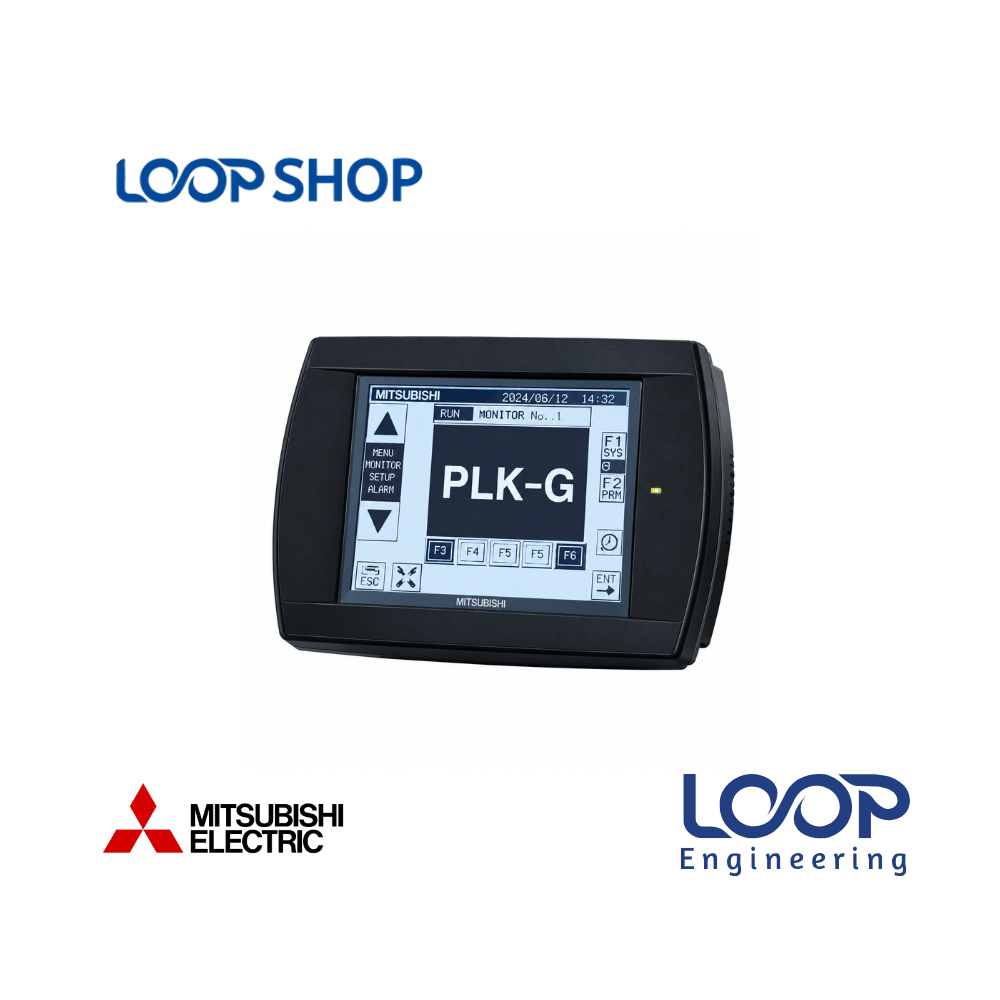
The Mitsubishi PLK-G-PAL Remote Operation Touch/Key Terminal Panel is a specialized teaching and control terminal designed exclusively for Mitsubishi PLK-G series industrial pattern sewing machines. Built to simplify machine setup and daily operator workflows, this handheld remote panel provides direct control over pattern selection, clamp lowering, speed settings, and maintenance functions such as bobbin winding.
By displaying interactive status screens—such as rotating the machine mechanism safely without running sewing patterns for bobbin winding—the PLK-G-PAL panel eliminates guess-work for machine technicians. Garment factory managers, maintenance engineers, and sewing operators across Bangladesh rely on this terminal to maintain optimal stitch accuracy, streamline pattern teaching, and keep automated garment production lines running continuously.
Key Features
- PLK-G Series Compatibility: Engineered specifically for Mitsubishi PLK-G series electronic pattern sewing controllers.
- Bobbin Winding Mode Display: Displays interactive prompts when clamp is lowered and start pedal is pressed to safely rotate the machine for bobbin winding without executing active stitch patterns.
- Intuitive Screen Navigation: Built-in dedicated keys (such as X Key and Back Key) allow fast return to previous menus and the main standard operating screen.
- Pattern Teaching & Editing: Facilitates direct input of sewing coordinates, pattern scaling, speed limits, and clamp control functions.
- Ergonomic Handheld Terminal Design: Lightweight, durable enclosure designed for comfortable operator holding and workstation mounting.
- Industrial Noise & Dust Resistance: Protected against industrial lint, oil vapor, static charges, and mechanical vibration typical in garment factories.
Technical Advantages
- High Efficiency Setup: Speeds up pattern switching, clamp adjustments, and bobbin preparation directly at the sewing head.
- Durable Construction: Impact-resistant industrial plastic housing engineered to withstand continuous daily use in busy sewing lines.
- Enhanced Safety Protection: Clear visual status alerts prevent accidental pattern stitching during setup or bobbin preparation routines.
- Easy Maintenance & Replacement: Plug-and-play connector interface enables quick replacement without modifying main machine controller parameters.
Applications
- Industrial Facilities: Automated sewing lines, heavy-duty stitching stations, leather product assembly, and automotive upholstery plants.
- Factory Environments: Ready-Made Garment (RMG) factories, textile finishing units, pocket-attaching stations, and denim sewing lines.
- Commercial & Utility Projects: Tailoring automation centers, industrial filter bag sewing, and footwear manufacturing facilities.
- Project Installation: Ideal for garment machine mechanics, factory maintenance teams, and textile automation engineers across Bangladesh.
Why Choose This Product?
- Genuine Mitsubishi Engineering: Guaranteed signal compatibility and exact communication protocol execution with PLK-G series controllers.
- Minimizes Sewing Line Downtime: Quick diagnostic access and easy bobbin winding mode selection keep sewing operators productive.
- Cost-Effective Terminal Replacement: Restores full remote teaching capability to pattern sewing machines without buying complete new drive units.
- Trusted Local Sourcing: Backed by technical accuracy, direct sourcing, and fast nationwide delivery through LOOP Shop in Bangladesh.
Technical Specification Table
| Specification |
Details |
| Model |
PLK-G-PAL |
| Brand |
Mitsubishi Electric |
| Application Type |
Remote Control Panel / Teaching Terminal |
| Target Machine |
Mitsubishi PLK-G Series Industrial Sewing Machines |
| Key Navigation |
Dedicated Navigation Keys (X Key, Back Key, Function Keys) |
| Special Functions |
Bobbin Winding Mode, Clamp Control, Pattern Navigation |
| Rated Power |
Not Available |
| Voltage |
Powered via Main Machine Controller |
| Current |
Not Available |
| Frequency |
Not Available |
| Efficiency |
High-efficiency ergonomic machine teaching terminal |
| Protection |
Industrial Dust & Oil Resistant Enclosure |
| Dimension |
Not Available |
| Weight |
Not Available |
| Operating Temperature |
0 °C to +50 °C |
| Warranty |
Standard Manufacturer Warranty |
Features List
- ✓ Handheld remote operator panel for Mitsubishi PLK-G pattern sewing machines
- ✓ Interactive bobbin winding mode screen for safe machine rotation without stitching
- ✓ Dedicated navigation buttons including X Key and Back Key for quick screen returns
- ✓ Pattern parameter editing, clamp control, and stitch speed adjustments
- ✓ Rugged industrial casing resistant to garment lint, oil, and vibration
- ✓ Direct plug-and-play connection to main sewing machine control box
Benefits For Customers
- Improves Operational Efficiency: Simplifies bobbin winding and pattern selection, reducing idle operator setup time.
- Prevents Fabric & Needle Damage: Allows mechanical rotation for bobbin winding without accidental pattern execution.
- Saves Maintenance Cost: Enables quick error diagnosis and parameter adjustments on the shop floor.
- Suitable for Bangladesh RMG Sector: Performs reliably under high heat, humidity, and continuous multi-shift production in BD garment plants.
Installation & Maintenance Guide
Installation Requirements:
- Power off the main Mitsubishi sewing machine control box before plugging in or disconnecting the PLK-G-PAL panel.
- Insert the remote terminal cable connector firmly into the designated remote socket on the main control unit and secure locking screws.
- Mount or hang the remote panel in the designated holder near the sewing workstation within comfortable operator reach.
Maintenance Tips:
- Clean the display screen and key membrane regularly using a dry, soft, lint-free cloth; do not use harsh chemical solvents or water.
- Inspect the terminal cable and strain relief boot periodically to prevent twisting, wire pinching, or insulation wear.
- Ensure the remote panel is securely docked in its holder when not in use to prevent accidental floor drops.
Safety Instructions:
- Always verify screen prompts before pressing the start pedal during setup or bobbin winding routines.
- Ensure hands are clear of needle bars and clamp mechanisms when rotating the machine using test keys.
Frequently Asked Questions (FAQ)
Q: What is the price of Mitsubishi PLK-G-PAL Sewing Machine Remote Panel in Bangladesh?
A: For live stock availability, competitive pricing, and commercial quotes in BD, please visit loopshop.com.bd or contact our customer sales team.
Q: Where can I buy original Mitsubishi PLK-G-PAL remote control panel in Bangladesh?
A: You can purchase genuine Mitsubishi industrial sewing machine spare parts online directly from LOOP Shop at loopshop.com.bd.
Q: Which sewing machine models are compatible with the PLK-G-PAL panel?
A: The PLK-G-PAL is specifically designed for Mitsubishi PLK-G series electronic pattern sewing machines.
Q: How do I access the bobbin winding mode on the PLK-G-PAL panel?
A: When the screen displays the bobbin winding prompt, lower the clamp and press the start pedal; the machine rotates safely without running the active stitch pattern.
Q: How do I return to the main standard screen from sub-menus?
A: Press the X Key to return to the previous screen, then press the Back Key to return to the main standard operating screen.
Q: What warranty does this product carry?
A: Standard supplier/manufacturer warranty terms apply when purchased through LOOP Shop. Contact our support team for specific terms.
Q: Is this panel durable for 24/7 garment factory environments in Bangladesh?
A: Yes, it features an industrial-grade enclosure built to withstand lint, oil vapor, and continuous multi-shift usage in BD garment plants.
Q: How to install this remote panel?
A: Turn off the main control unit, connect the terminal cable to the remote socket, tighten connector screws, and dock the panel near the machine head.
Q: Can this terminal be used to edit sewing patterns?
A: Yes, it allows operators and technicians to navigate pattern options, adjust clamp functions, and modify basic stitch parameters.
Q: Does LOOP Shop deliver sewing machine spare parts across all districts in Bangladesh?
A: Yes, LOOP Shop provides nationwide delivery to all major industrial districts, RMG hubs (Dhaka, Gazipur, Narayanganj, Chattogram), and factory zones across BD.



Reviews
There are no reviews yet.