Description
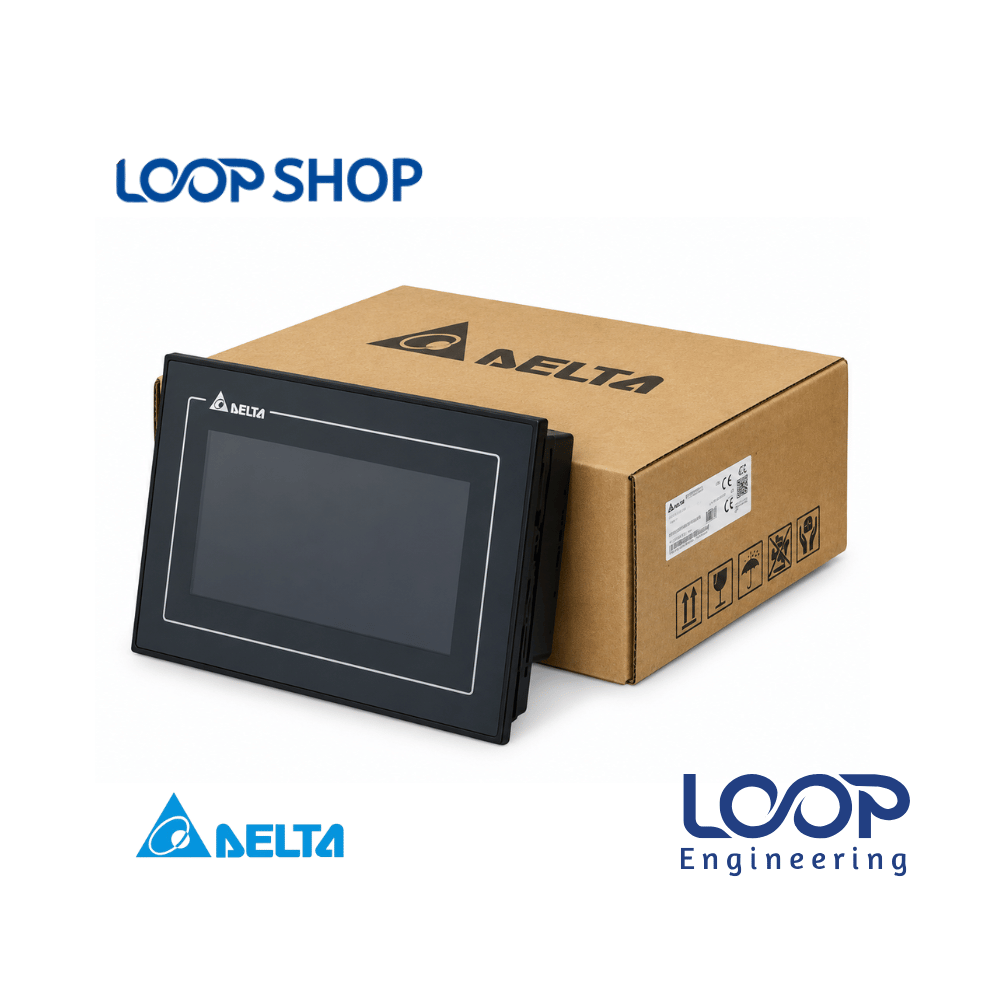
The Delta DOP-110ES is a large-format 10.1-inch TFT color touch screen Human Machine Interface (HMI) from Delta’s advanced DOP-100 series. Designed to enable intuitive interaction between operators and automated machinery, this display panel serves as an interactive operational gateway to manage system parameters, observe real-time process data, and execute control commands.
Configured via Delta’s predefined DOPSoft programming software, the DOP-110ES converts complex machine telemetry and sensor data into clean graphic displays, dynamic trend charts, and active system alarm notifications. It provides an ideal control solution for manufacturing facilities, OEM panel fabricators, and automation engineers across Bangladesh looking to optimize factory workflows, reduce wiring complexity, and lower long-term maintenance costs.
Key Features
- 10.1-Inch Color TFT LCD Touch Screen: Provides an expansive, high-contrast widescreen viewing area for visual tracking and intuitive parameter entries.
- Multiple Communication Ports: Onboard serial ports supporting RS-232, RS-422, and RS-485 interfaces for flexible multi-device connectivity.
- User-Friendly DOPSoft Software: Simplifies creation of custom monitoring screens, visual navigation icons, historical logs, and alarm banners.
- IP65 Front Ingress Protection: Seals the front display assembly against industrial dust, oil mists, and moisture splashing.
- Data Upload & Download Support: Supports fast uploading and downloading of project files, recipe parameters, and operational sequences.
- Broad Ecosystem Interoperability: Connects natively with Delta PLCs, AC motor drives, servo systems, and temperature controllers.
Technical Advantages
- Durable Construction: Industrial-grade enclosure engineered to resist continuous mechanical vibration, ambient noise, and thermal variation.
- Energy-Efficient Operation: Low power operational draw running on a standard 24 VDC industrial power source.
- Rapid System Development: Simplifies overall control cabinet wiring, eliminates unnecessary interface hardware, and lowers installation overhead.
- Easy Maintenance & Diagnostics: Onscreen diagnostics, simple project transfers, and straightforward parameter editing reduce field service downtime.
Applications
- Industrial & Factory Automation: Textile machinery, pharmaceuticals, automatic packaging lines, plastic extruders, and food processing plants.
- Commercial Systems: Large-scale water purification plants, commercial HVAC monitoring systems, and central pump automation.
- Project Installation: Complete factory SCADA/HMI panel retrofits, custom OEM machinery fabrication, and industrial control panel building.
Why Choose This Product?
- Proven Delta Reliability: Engineered to strict international standards, ensuring consistent long-term touch accuracy and low hardware failure rates.
- Enhanced Visual Space: Large 10.1-inch display provides ample screen space for complex operational layouts without visual clutter.
- High Cost Effectiveness: Delivers large-screen interactive capabilities, flexible communication options, and IP65 protection at an accessible price point.
- After-Sales Support: Backed by product authenticity, fast nationwide delivery, and technical guidance through LOOP Shop in Bangladesh.
Technical Specification Table
| Specification |
Details |
| Model |
DOP-110ES |
| Brand |
Delta |
| Display Size |
10.1 Inch |
| Display Type |
TFT Color LCD Touch Screen |
| Serial Interfaces |
RS-232, RS-422, RS-485 |
| USB Interfaces |
USB Host, USB Client |
| Ethernet Port |
Not Available |
| Rated Power |
Not Available |
| Voltage |
24 VDC |
| Current |
Not Available |
| Frequency |
DC Input (N/A) |
| Operating Efficiency |
High-efficiency interactive touch control & low power draw |
| Protection |
IP65 (Front Panel) |
| Dimension |
Not Available |
| Weight |
Not Available |
| Operating Temperature |
0°C to 50°C |
| Programming Software |
Delta DOPSoft (Free Download) |
| Warranty |
Standard Manufacturer Warranty |
Features List
✓ Large 10.1-inch TFT color LCD touch screen display
✓ Onboard multi-protocol serial communication ports (RS-232 / RS-422 / RS-485)
✓ USB Host and USB Client interfaces for logging and project transfers
✓ IP65 protected front panel against dust and liquid splash
✓ Configured using user-friendly Delta DOPSoft software
✓ Real-time trend graphs, dynamic graphics, and alarm management
✓ Energy-efficient 24 VDC industrial power supply input
Benefits For Customers
- Improves Machine Productivity: Large 10.1-inch screen allows operators to monitor multiple process loops and adjust operational setpoints easily on a single view.
- Accelerates Fault Diagnostics: Integrated real-time alarm displays enable maintenance teams to identify and resolve operational errors quickly.
- Saves Installation & Cable Costs: Onboard multi-serial communication ports reduce the need for external protocol converters and panel wiring.
- Suitable for Bangladesh Operating Environment: IP65 sealed front panel protects internal electronics against high humidity, dust, and temperature variations common in Bangladesh factories.
Installation & Maintenance Guide
Installation Requirements:
- Cut out the electrical control door panel according to the designated Delta 10.1-inch DOP series mounting dimensions.
- Insert the HMI unit into the cutout and secure it tightly using the provided side mounting clamps to establish an IP65 front seal.
- Ensure adequate spacing behind the rear housing for natural heat dissipation and cable bend space.
- Wire a clean 24 VDC regulated power supply with proper frame grounding to protect internal circuits from electrical surges.
Maintenance Tips:
- Clean the display surface gently using a soft, clean dry cloth. Avoid harsh chemical sprays, alcohol, or abrasive cleaning pads.
- Periodically clean surrounding cabinet ventilation slots to maintain adequate internal cooling.
- Keep backed-up copies of HMI screen project files on a USB drive or PC for quick field replacement setup.
Safety Instructions:
- Always turn off main input power before conducting wiring, terminal connections, or installation work.
- Verify 24 VDC input power supply polarity before applying power to prevent internal circuit board damage.
- Avoid pressing the touch screen with sharp tools, screwdrivers, or excessive force.
Frequently Asked Questions (FAQ)
Q: What is the price of Delta DOP-110ES 10.1 inch HMI in Bangladesh?
A: The price of the Delta DOP-110ES in Bangladesh depends on import tariffs and current stock levels. Please check the product listing on LOOP Shop or contact our customer support for an updated price quote.
Q: Where can I buy original Delta DOP-110ES in Bangladesh?
A: You can purchase genuine Delta DOP-110ES touch screen display HMIs online directly from LOOP Shop (loopshop.com.bd) with fast delivery across Bangladesh.
Q: What warranty does this product have?
A: The Delta DOP-110ES comes with standard manufacturer warranty coverage against operational defects, supported by LOOP Shop customer service.
Q: Is this product suitable for Bangladesh climate?
A: Yes, featuring an IP65 rated front panel and robust operating thermal resistance, it is fully equipped for continuous operation in Bangladesh industrial environments.
Q: How to install this product?
A: Mount the panel into the designated door cutout on your control box, clamp it securely, connect your 24 VDC power lines and RS-232/RS-485 serial cables, and upload your project software via USB.
Q: What software is used to program the Delta DOP-110ES?
A: The Delta DOP series HMIs are programmed using Delta’s freely available DOPSoft configuration software.
Q: Does the Delta DOP-110ES have a built-in Ethernet port?
A: No, the DOP-110ES model relies on serial communication ports (RS-232, RS-422, RS-485) and USB interfaces. If Ethernet connectivity is required, consider Delta DOP-100 series Ethernet variants.
Q: What is the display size of Delta DOP-110ES?
A: It features a large 10.1-inch widescreen TFT color touch screen display.
Q: What power supply voltage is required for operation?
A: It operates on a standard industrial 24 VDC power supply.
Q: Can this Delta HMI connect to non-Delta PLCs?
A: Yes, Delta DOPSoft supports communication drivers for various popular third-party PLCs, VFDs, and industrial controllers over serial interfaces.




Reviews
There are no reviews yet.