Description
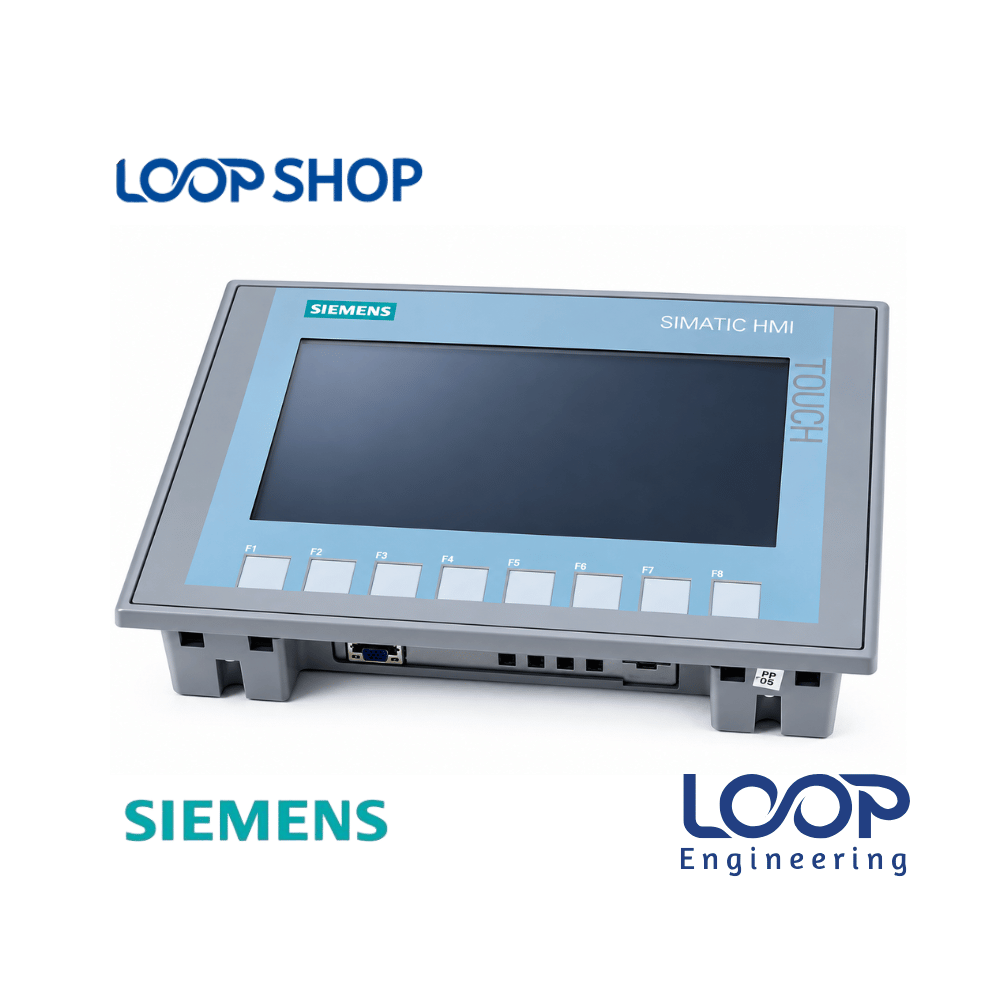
The Siemens SIMATIC HMI KTP700 Basic PN Panel (6AV2123-2GB03-0AX0) is an advanced 2nd Generation entry-level operator interface engineered for clear visualization and intuitive control of small to mid-sized automated machinery. Featuring a bright 7.0-inch widescreen TFT display rendering 65,536 colors at $800 \times 480$ pixel resolution, this panel combines an analog-resistive touch surface with 8 tactile, freely assignable membrane function keys for flexible operator interaction.
Equipped with an integrated RJ45 Industrial Ethernet interface supporting PROFINET communication protocols, the KTP700 Basic PN connects directly to Siemens SIMATIC S7-1200, S7-1500, S7-300, and LOGO! controllers. For panel builders, OEMs, and maintenance technicians in Bangladesh, this unit serves as a highly reliable, cost-effective display terminal that optimizes real-time process tracking, fault alarm reporting, and recipe adjustments on active plant floors.
Key Features
- 7.0-Inch Widescreen Color TFT Display: Sharp $800 \times 480$ pixel resolution presenting 65,536 bright colors for clear process mimic diagrams and trend graphics.
- Hybrid Touch & Key Operation: Combines an analog-resistive touch screen with 8 tactile function keys for versatile operator inputs.
- PROFINET Ethernet Interface: Integrated RJ45 Ethernet port supporting PROFINET and TCP/IP protocols for fast fieldbus data exchange.
- 10 MB User Memory: Generous internal flash memory capacity for storing screen layouts, recipe data, and alarm archives.
- USB 2.0 Host Interface: Integrated USB port for easy flash drive project backups, recipe transfers, and firmware updates.
Technical Advantages
- High Efficiency: Swift boot times and responsive screen refresh rates eliminate operational latency during routine batch changes.
- Durable Construction: Industrial-grade IP65 front faceplate protects internal electronics against factory airborne dust, lint, and light moisture splatters.
- Safety Protection: Built-in multi-level user password protection and active diagnostic alarm displays safeguard process parameters.
- Energy Saving: Dimmable LED backlight technology minimizes operational power consumption ($5.5 \text{ W}$ typical) and limits cabinet heat buildup.
- Easy Maintenance: Standardized panel cutout dimensions and clip-in cabinet mounting simplify hardware installation and servicing.
Applications
- Industrial: Automated packaging machinery, plastic sealing equipment, chemical dosing units, and conveyor sorting lines.
- Factory: Textile yarn spinning auxiliaries, garment processing machinery, pharmaceutical tablet presses, and labeling lines.
- Commercial: Building management systems, small pump stations, and water filtration control boxes.
- Project Installation: Control cabinet builds, OEM machine retrofitting, and PLC-HMI panel maintenance across Bangladesh.
Why Choose This Product?
- Reliability: Built to Siemens’ rigorous industrial standards for continuous 24/7 duty cycles ($20,000 \text{ hours}$ backlight MTBF).
- Performance: Bright 65k-color graphics, responsive touch tracking, and fast Industrial Ethernet networking.
- Cost Effectiveness: Delivers superior 7-inch color visualization at a budget-friendly price point, lowering overall control panel costs.
- After-Sales Value: Supported by genuine product verification, checking warranty guarantees, and prompt delivery through LOOP Shop in BD.
Technical Specification Table
| Specification |
Details |
| Model |
KTP700 Basic PN (6AV2123-2GB03-0AX0) |
| Brand |
Siemens |
| Processor Type |
ARM Processor |
| Display Size |
7.0 Inches Widescreen TFT |
| Resolution |
$800 \times 480$ Pixels |
| Color Number |
65,536 Colors |
| Configuration Memory |
10 MB User Data Memory |
| Interface |
$1 \times$ RJ45 Ethernet Port (PROFINET), $1 \times$ USB 2.0 |
| Rated Power |
Approx. $5.5 \text{ W}$ (Active Power Input, Typical) |
| Voltage |
24V DC (Permissible Range: 19.2V to 28.8V DC) |
| Current |
Approx. $230 \text{ mA}$ |
| Frequency |
Not Available |
| Efficiency |
High Efficiency Process Visualization |
| Protection |
IP65 (Front Bezel), IP20 (Rear Enclosure) |
| Dimension |
$214 \text{ mm} \times 158 \text{ mm} \times 39 \text{ mm}$ (Cutout: $197 \text{ mm} \times 141 \text{ mm}$) |
| Weight |
Approx. $0.78 \text{ kg}$ (Net Weight) |
| Operating Temperature |
0°C to +50°C (Vertical Installation) |
| Warranty |
Standard Manufacturer Warranty |
Features List
✓ 7.0-inch 65,536-color TFT widescreen display ($800 \times 480$ pixel resolution)
✓ Dual-input operation: touch screen and 8 tactile, freely assignable function keys
✓ Integrated RJ45 Ethernet port supporting PROFINET and TCP/IP communication
✓ Built-in USB 2.0 host port for flash drive backups and peripheral connection
✓ IP65 dust-tight and splash-water resistant front bezel
Benefits For Customers
- Saves Maintenance Cost: Direct replacement for damaged 7-inch HMI panels without altering host PLC code.
- Reduces Cabinet Space: Shallow enclosure depth ($39 \text{ mm}$) allows easy fitting on control box doors.
- Improves Operational Reliability: High-resolution widescreen workspace displays exact fault messages for fast operator response.
- Suitable for Bangladesh Environment: Rugged IP65 front face protects against dusty, humid, and warm factory environments in BD.
Installation & Maintenance Guide
Installation Requirements:
- Prepare a clean panel door cutout measuring $197 \text{ mm} \times 141 \text{ mm}$ to match the KTP700 Basic mounting profile.
- Position the supplied front rubber sealing gasket around the bezel to ensure an IP65 moisture-tight fit.
- Insert the KTP700 module into the cutout and tighten all cabinet mounting clamps evenly.
- Wire a regulated 24V DC power supply line to the power connector and attach the RJ45 PROFINET Ethernet cable securely.
Maintenance Tips:
- Clean the display surface gently using a soft, non-abrasive dry microfiber cloth.
- Avoid applying alcohol, harsh chemical solvents, or abrasive cleaning wipes directly on the touch screen.
- Check terminal blocks and Ethernet connector latches periodically to ensure solid contact despite machine vibration.
Safety Instructions:
- Always turn off main control panel power before connecting power terminals or mounting the panel.
- Ensure proper earthing/grounding of the cabinet frame to prevent static discharge on communication lines.
Frequently Asked Questions (FAQ)
Q: What is the price of SIEMENS KTP700 Basic PN HMI 6AV2 123-2GB03-0AX0 in Bangladesh?
A: The current sales price of the Siemens KTP700 Basic PN (6AV2123-2GB03-0AX0) in BD is listed on loopshop.com.bd. Contact us directly or check our website for live stock and price details.
Q: Where can I buy SIEMENS KTP700 Basic PN HMI 6AV2 123-2GB03-0AX0 in Bangladesh?
A: You can purchase the genuine Siemens KTP700 Basic PN panel online directly from loopshop.com.bd with courier delivery across all districts in Bangladesh.
Q: What warranty does this product have?
A: It comes with an official Siemens warranty and checking guarantee from LOOP Shop to confirm full operational condition upon delivery.
Q: Is this suitable for Bangladesh climate?
A: Yes, featuring an IP65 dust- and water-resistant front bezel and an operating temperature threshold up to 50°C, it is well suited for industrial factory conditions in BD.
Q: How to install this product?
A: Cut the designated panel opening ($197 \text{ mm} \times 141 \text{ mm}$), insert the unit with its sealing ring, tighten mounting clamps, connect 24V DC power, and attach the PROFINET Ethernet cable.
Q: Which software is used to program the Siemens KTP700 Basic PN HMI?
A: It is programmed using Siemens WinCC Basic V13 (or STEP 7 Basic V13) and newer versions within TIA Portal.
Q: Does this panel feature tactile function keys?
A: Yes, it features 8 tactile, freely assignable function keys located beneath and alongside the touch screen display area.
Q: Can this HMI connect directly to a Siemens S7-1200 PLC?
A: Yes, it connects seamlessly to S7-1200, S7-1500, S7-300, and LOGO! controllers via its integrated RJ45 PROFINET Ethernet port.
Q: Can I back up project data using a USB flash drive?
A: Yes, the built-in USB 2.0 host port allows project backups, recipe data transfers, and firmware updates using a standard USB flash drive.
Q: Does LOOP Shop provide courier delivery outside Dhaka?
A: Yes, LOOP Shop ships industrial automation equipment to Gazipur, Savar, Narayanganj, Chittagong, and all other industrial regions across Bangladesh.




Reviews
There are no reviews yet.