Description
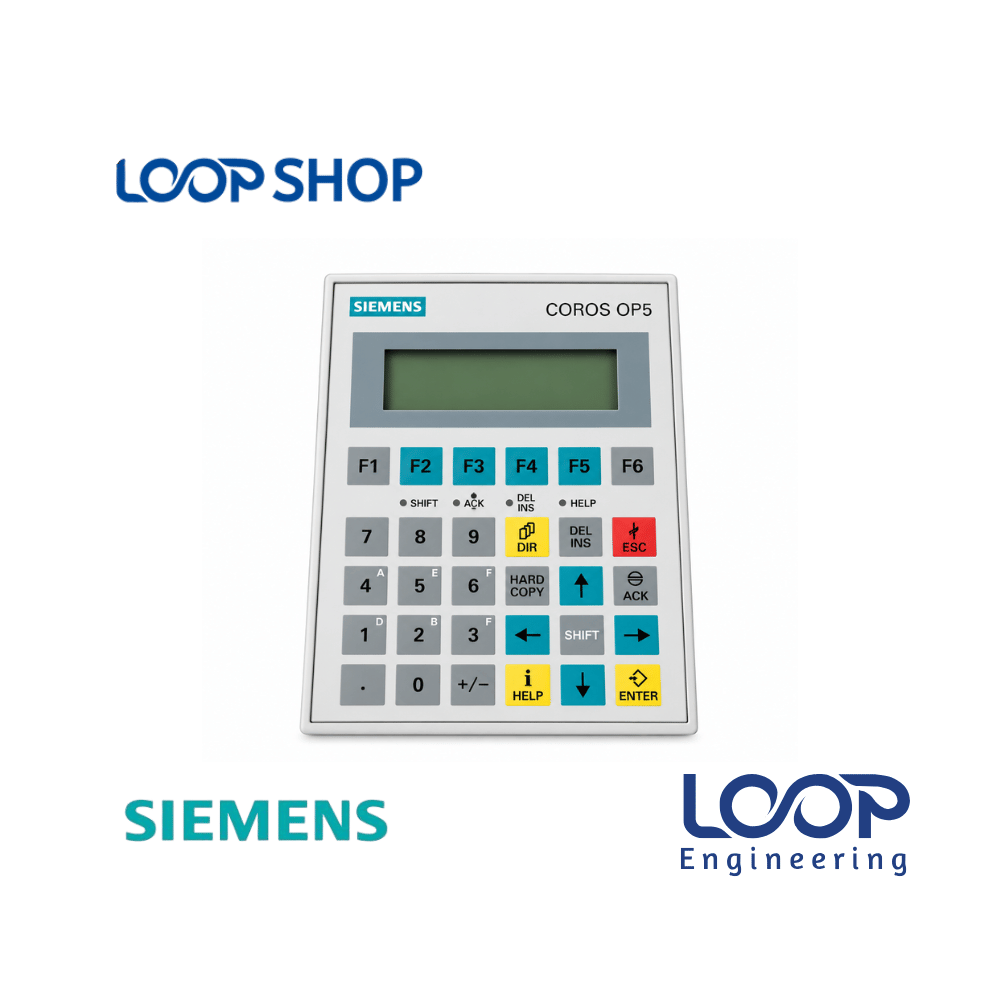
The Siemens SIMATIC HMI OP5-A2 (6AV3505-1FB12) is a rugged, tactile text-based operator panel belonging to the classic COROS OP5 series. Designed to serve as a reliable human-machine interface, it bridges operator control with legacy Siemens SIMATIC S5 and early S7 automation systems. Through its tactile keypad and alphanumeric text display, operators can monitor process states, adjust operational parameters, and evaluate diagnostic message texts directly on the factory floor.
Although designated as a legacy product by Siemens, the OP5-A2 remains a vital component for industrial plants in Bangladesh that rely on established machinery. Utilizing an OP5-A2 panel allows plant engineers to immediately fix line stoppages caused by faulty display interfaces without undertaking expensive, time-consuming PLC upgrades or reprogramming entire control architectures.
Key Features
- Tactile Function Keypad: Features durable membrane keys for precise parameter entry, screen navigation, and system commands.
- Alphanumeric Text Display: High-contrast text display line for clear message display, setpoint values, and system status alerts.
- Legacy PLC Compatibility: Direct communication support for Siemens SIMATIC S5 (TTY/Current Loop) and early S7 PLC systems (MPI/PPI).
- Industrial Panel Mount: Rugged bezel construction designed for panel-door installation with front dust and splash protection.
- Non-Volatile Memory: Safely retains system configurations and message assignments even during sudden power outages.
Technical Advantages
- Durable Construction: Built with an industrial-grade front housing designed to withstand continuous shop-floor keypad usage and ambient environmental exposure.
- Safety Protection: Color-coded status indication and clear error message outputs help operators maintain safe production boundaries.
- Easy Maintenance: Quick unit swap capabilities enable rapid restoration of machine functionality during operator interface failures.
- High Operational Efficiency: Direct hardware key inputs reduce operator error rates when executing frequent machine commands.
Applications
- Industrial: Machine control panels, conveyor control systems, and automated packaging lines.
- Factory: Textile spinning and weaving equipment, paper manufacturing systems, and chemical processing plants.
- Commercial: Centralized pumping stations, boiler controls, and legacy generator management panels.
- Project Installation: Machinery retrofits, maintenance spares replacement, and legacy system repairs across Bangladesh.
Why Choose This Product?
- Reliability: Time-tested Siemens COROS engineering guarantees stable operational performance in heavy industrial setups.
- Performance: Direct communication links with legacy SIMATIC controllers ensure rapid key-response times and real-time status updates.
- Cost Effectiveness: Eliminates the major capital expenditure of replacing working SIMATIC S5/S7 PLCs just to update an operator display.
- After-Sales Value: Highly valued replacement component with established local engineering familiarity across Bangladesh manufacturing hubs.
Technical Specification Table
| Specification |
Details |
| Model |
SIMATIC HMI OP5-A2 (6AV3505-1FB12) |
| Brand |
Siemens |
| Rated Power |
Standard Operating Power Consumption |
| Voltage |
24 V DC Operational Input |
| Current |
Low Input Operating Current |
| Frequency |
DC Supply (0 Hz) |
| Efficiency |
Standard Legacy Logic Efficiency |
| Protection |
IP65 (Front Panel) / IP20 (Rear) |
| Dimension |
Standard Siemens COROS OP5 Cutout & Bezel Dimensions |
| Weight |
Standard Industrial Operator Panel Weight |
| Operating Temperature |
0 °C to +50 °C Operating Ambient |
| Warranty |
Standard Manufacturer Warranty |
Features List
✓ Legacy COROS series text-based operator interface panel
✓ Tactile membrane keyboard for entry and system commands
✓ Direct interface compatibility with SIMATIC S5 and S7 PLCs
✓ Non-volatile memory buffering for message and setpoint storage
✓ IP65 front face protection against industrial dust and splashes
Benefits For Customers
- Saves Capital Expenditure: Restores older automated lines without needing to purchase new PLCs or re-engineer entire control systems.
- Improves Operational Reliability: Provides physical, tactile button feedback that minimizes input errors in industrial shop environments.
- Reduces Production Downtime: Direct plug-in replacement for failed OP5 terminals allows rapid recovery from line stoppages.
- Suitable for Bangladesh Environment: Sealed front panel withstands high humidity, dust, and heat common in Bangladeshi factory floors.
Installation & Maintenance Guide
Installation Requirements:
- Verify that panel cutout dimensions match standard Siemens OP5 chassis specifications prior to mounting.
- Ensure the power supply provides a stable 24V DC voltage with correct wiring polarities.
- Secure mounting clamps uniformly along the bezel to maintain the IP65 front panel seal.
- Connect the appropriate serial interface cable (TTY for S5, MPI/PPI for S7) securely to the communication port.
Maintenance Tips:
- Wipe the front membrane keypad with a soft, clean cloth using mild non-abrasive detergent; avoid strong solvents.
- Inspect rear cable connectors and power terminal screws periodically to ensure connections remain tight despite machinery vibration.
- Keep control cabinet air vents clear to maintain adequate ambient cooling behind the unit.
Safety Instructions:
- Disconnect all power to the control cabinet before installing, removing, or servicing the operator panel.
- Ensure electrical grounding adheres to Siemens industrial installation guidelines to prevent static discharge damage.
- Installation and serial communications setup should only be carried out by qualified electrical technicians or automation engineers.
Frequently Asked Questions (FAQ)
Q: What is the price of Siemens OP5-A2 HMI 6AV3505-1FB12 in Bangladesh?
A: The price of the Siemens OP5-A2 operator panel in Bangladesh depends on current stock availability and market conditions. Please check loopshop.com.bd or contact our team for live pricing.
Q: Where can I buy Siemens OP5-A2 HMI 6AV3505-1FB12 in Bangladesh?
A: You can purchase genuine Siemens OP5-A2 operator panels online directly through loopshop.com.bd with reliable nationwide delivery across Bangladesh.
Q: What warranty does this product have?
A: It includes a standard supplier guarantee covering hardware integrity and functional performance upon delivery.
Q: Is this suitable for Bangladesh climate?
A: Yes, the IP65-rated front panel and industrial housing are engineered to handle typical factory heat and dust in Bangladesh.
Q: How to install this product?
A: Fit the panel into the cabinet cutout, secure it with mounting clips, wire the 24V DC power terminal, and attach the communication cable to your SIMATIC controller.
Q: Is the Siemens OP5-A2 compatible with SIMATIC S5 controllers?
A: Yes, the OP5-A2 features TTY serial communications specifically designed to link with SIMATIC S5 automation systems.
Q: Can the Siemens OP5-A2 connect to SIMATIC S7 PLCs?
A: Yes, it supports serial/MPI communication protocols compatible with early SIMATIC S7-300 and S7-400 systems.
Q: Is the Siemens OP5-A2 a text-based or graphical HMI display?
A: The OP5-A2 is a text-based operator display featuring an alphanumeric display line and a tactile membrane keypad.
Q: What programming software was used for the Siemens OP5 family?
A: Legacy COROS OP5 panels were typically configured using Siemens ProTool or COM TEXT software tools.
Q: Why buy a legacy OP5-A2 panel instead of upgrading to a modern touch screen?
A: Replacing the unit directly with an OP5-A2 saves huge costs and time by avoiding major cabinet redesigns, program rewriting, and PLC upgrades.




Reviews
There are no reviews yet.